Port real AI models, run them on actual edge hardware, and share reproducible results. Pick a quest (Vision, Speech, LLMs, Robotics, Systems, or Wildcard), join the Hugging Face org, and submit your work via the CORE-ET model repo. Beginners start with existing benchmarks; experts push new kernels and novel models.
🚀 What Is the AIFoundry CORE-ET Hackathon?
The AIFoundry CORE-ET Hackathon is a community-driven event where participants take open-source AI models and make them run efficiently on real edge hardware — think Raspberry Pi, RISC-V boards, embedded devices, and other low-power silicon.
The mission is simple: Port real models. Run them on real silicon. Share the results.
This isn’t a cloud-only hackathon. The goal is to bring AI workloads closer to the edge — where latency, power, and privacy matter most.
🔗 Hackathon Hub: huggingface.co/AIFoundry-hackathon
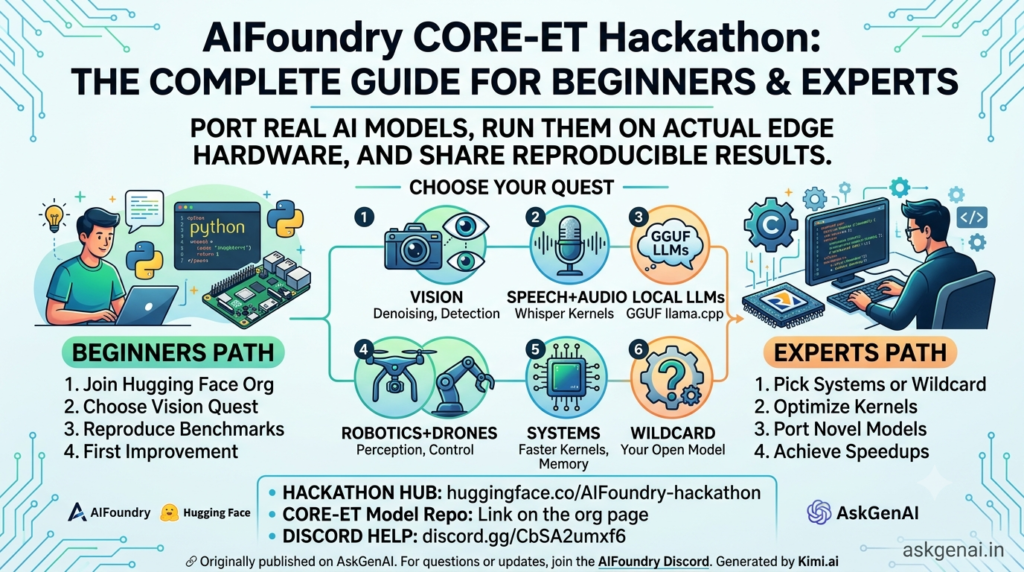
🧩 The Six Quests You Can Choose From
| Quest | What You Can Build |
|---|---|
| 👁️ Vision | Denoising, detection, camera-first edge workloads |
| 🎙️ Speech + Audio | Whisper-style kernels and streaming-friendly pipelines |
| 🧠 Local LLMs | GGUF and llama.cpp flows on ET-backed runtimes |
| 🤖 Robotics + Drones | Perception, control, and low-power deployment paths |
| ⚙️ Systems | Faster kernels, better memory movement, cleaner board runners |
| 🧪 Wildcard | Bring your own open model and make the benchmark reproducible |
🧭 How Participation Works (The Universal Flow)
Whether you’re a beginner or an expert, the core workflow is the same:
1. 🤝 Join the Hugging Face organization
2. 👯 Team up or go solo
3. 🎯 Pick a model, kernel, benchmark, or demo target
4. 📚 Use the CORE-ET model repo to follow the technical path
5. 🚀 Submit your port or improvement
6. 📊 The board workflow runs and comments back with results
🔗 Join the Org: huggingface.co/AIFoundry-hackathon
🔗 CORE-ET Model Repo: Link on the org page
💬 Discord Help: discord.gg/CbSA2umxf6
🌱 PATH A: Beginner’s Roadmap
“I know some Python, I’ve heard of AI, but I’ve never ported a model to hardware before.”
Step 1: Set Up Your Accounts (5 minutes)
| What | Why | Link |
|---|---|---|
| Hugging Face Account | Where models live and where the hackathon happens | huggingface.co/join |
| GitHub Account | Where code lives and where you submit | github.com/signup |
| Discord Account | Where you ask for help | discord.com |
Action: Create all three. Join the AIFoundry Hackathon Discord and say hi in #community-lab.
Step 2: Join the Organization (2 minutes)
- Go to huggingface.co/AIFoundry-hackathon
- Click “Request to Join”
- Wait for approval (usually quick)
Why this matters: The org page is your public roster — teams, models, demos, and board results all live here.
Step 3: Pick the Easiest Quest — Vision (5 minutes)
For beginners, Vision is the friendliest starting point. Why?
- Lots of existing examples (DnCNN, YOLO)
- You can see results visually (images in, images out)
- Hugging Face has tons of pre-trained vision models
Action: Commit to the Vision quest. Write it down.
Step 4: Explore the CORE-ET Model Repo (15 minutes)
- From the org page, find and click the CORE-ET model repo
- Look for folders like:
examples/— starter codebenchmarks/— how performance is measureddocs/— instructionsvision/— your quest area
Action: Read the README. Don’t understand everything? That’s fine. Just get familiar with the layout.
Step 5: Reproduce an Existing Benchmark (Your First Win!)
This is the most important step for beginners. Don’t build new — copy first.
What to do:
- Find an existing benchmark in the repo (e.g., DnCNN denoising or YOLO detection)
- Read the
README.mdinside that folder - Follow the setup instructions EXACTLY
- Run the code on your computer (cloud is fine for now!)
Why this matters:
- You learn the submission format
- You understand the board workflow
- You prove the system works before you change anything
Action: Pick ONE existing benchmark and get it running. Celebrate when it works!
Step 6: Make One Small Improvement (Your First Contribution)
Once the benchmark runs, make a tiny change:
| Easy Win | What to Do |
|---|---|
| Swap the image | Use a different test image and show it still works |
| Add logging | Print “Model loaded successfully” or timing info |
| Try a different model | Replace microsoft/resnet-50 with google/vit-base-patch16-224 |
| Document better | Rewrite the README with clearer steps for the next beginner |
Action: Make one change, test it, and document what you did.
Step 7: Submit Your First PR (Pull Request)
- Fork the CORE-ET repo on GitHub (creates your copy)
- Clone it to your computer:
git clone <your-fork-url> - Create a branch:
git checkout -b my-first-vision-improvement - Add your changes (code + documentation)
- Commit:
git commit -m "Improved DnCNN benchmark with clearer docs" - Push:
git push origin my-first-vision-improvement - Open a Pull Request on GitHub
The board workflow will run automatically and comment with results.
🎯 Beginner’s Milestones
| Milestone | What It Looks Like |
|---|---|
| ✅ Week 1 | Joined org, read docs, reproduced one benchmark |
| ✅ Week 2 | Made first small improvement, submitted first PR |
| ✅ Week 3 | Helped another participant in Discord |
| ✅ Week 4 | Submitted a complete demo showing your model running |
🚀 PATH B: Expert’s Roadmap
“I know PyTorch, I’ve optimized models before, and I want to push hardware limits.”
Strategy 1: Pick a Hard Quest — Systems or Wildcard
| Quest | Expert Angle |
|---|---|
| ⚙️ Systems | Write faster kernels, optimize memory movement, create cleaner board runners |
| 🧪 Wildcard | Port a cutting-edge model no one has tried on edge hardware yet |
| 🤖 Robotics + Drones | Real-time perception pipelines with strict latency budgets |
Action: Choose based on your expertise. Systems experts go for kernels. Model experts go for Wildcard.
Strategy 2: Deep Dive into the Board & Runtime
Experts need to understand:
- What silicon is supported? (RISC-V? ARM? Custom?)
- What runtime? (ExecuTorch? llama.cpp? Custom?)
- What benchmark metrics matter? (Latency? Throughput? Power? Accuracy?)
Action: Read the technical docs in the CORE-ET repo thoroughly. Join Discord and ask the maintainers about hardware access.
Strategy 3: Port a Novel Model
Instead of improving existing work, bring something new:
1. Pick a recent open model from Hugging Face Hub
2. Pin the exact repo, revision, and file references
3. Write the port layer (model → runtime → board)
4. Create reproducible benchmark scripts
5. Document board results with numbers
Key requirement: Your submission must be reproducible. Anyone should be able to run your code and get the same results.
Strategy 4: Optimize at the Kernel Level
For Systems quest participants:
- Profile existing kernels to find bottlenecks
- Rewrite hot paths in optimized C/assembly
- Improve memory layout and data movement
- Document before/after performance on actual hardware
Action: Find the slowest kernel in an existing benchmark. Make it 2x faster. Submit with proof.
Strategy 5: Mentor & Build Community
Experts can multiply their impact:
- Answer questions in Discord
#community-lab - Review PRs from beginners
- Write tutorials for complex ports
- Pair with beginners to help them reproduce your work
Action: Help one beginner reproduce a run. It’s listed as a “good first contribution” for a reason.
🎯 Expert’s Milestones
| Milestone | What It Looks Like |
|---|---|
| ✅ Day 1-2 | Understood board runtime, identified optimization target |
| ✅ Week 1 | Submitted first kernel improvement or novel model port |
| ✅ Week 2 | Achieved measurable speedup or new model running on hardware |
| ✅ Week 3 | Mentored a beginner, improved documentation |
| ✅ Week 4 | Submitted a demo that shows real-world edge deployment |
📊 Good First Contributions (For Everyone)
| Contribution | Beginner? | Expert? | Impact |
|---|---|---|---|
| Improve DnCNN benchmark | ✅ Easy | ✅ Can optimize further | Medium |
| Improve YOLO detection | ✅ Moderate | ✅ Can rewrite kernels | High |
| Add new open model with pinned HF reference | ❌ Hard | ✅ Core strength | Very High |
| Make a kernel faster + document board result | ❌ Very Hard | ✅ Core strength | Very High |
| Package a small demo | ✅ Easy | ✅ Can make it production-ready | Medium |
| Help another participant reproduce a run | ✅ Easy | ✅ Easy | High (community!) |
💬 Getting Help
| Channel | Best For |
|---|---|
| Discord #community-lab | Quick questions, finding teammates, debugging |
| GitHub Issues | Bug reports, feature requests, technical discussions |
| Hugging Face Org Discussions | General hackathon updates, announcements |
When asking for help, include:
- What quest you’re working on
- What hardware (if any) you have access to
- What you’ve tried so far
- The exact error message (if stuck)
🏁 Final Checklist
Before You Start:
- [ ] Created Hugging Face account
- [ ] Created GitHub account
- [ ] Joined AIFoundry Hackathon org
- [ ] Joined Discord
- [ ] Read the CORE-ET model repo README
- [ ] Picked a quest
During the Hackathon:
- [ ] Reproduced at least one existing benchmark
- [ ] Made and submitted one improvement
- [ ] Documented your work clearly
- [ ] Engaged with the community (asked or answered a question)
Before Submitting:
- [ ] Code runs without errors
- [ ] Results are reproducible (pinned model references)
- [ ] README explains what you did and why it matters
- [ ] Board workflow passes (or you understand why it fails)
Remember: This hackathon is about making AI real on real hardware. Whether you’re writing your first Python script or hand-optimizing assembly kernels, there’s a place for you. Start where you are, use what you have, and help someone else along the way.
Happy hacking! 🤗⚡
Originally published on AskGenAI. For questions or updates, join the AIFoundry Discord.